
1. Animaker
Animaker is a popular online AI-powered video creation platform specializing in animated videos (and also supporting live-action elements). It’s designed to make professional-quality video production accessible to everyone — from beginners and non-designers to marketers, educators, content creators, businesses, and teams — without needing advanced skills or expensive software.
The official website is https://www.animaker.com/, where you can sign up for a free plan and start creating right away.
Key Features of Animaker AI Video Generator
Animaker stands out for its AI-driven tools that speed up the entire video-making process. Here are the main highlights (based on its current offerings as of 2026):
- Text-to-Video Generation — Input a simple text prompt, script, or idea, and the AI automatically generates full videos with scenes, characters, voiceovers, subtitles, music, and transitions in minutes. It supports both animated explainers and more realistic clips.
- AI Clip Generator — Create ultra-realistic or stylized short clips directly from prompts or uploaded media.
- AI Whiteboard Animation — Turn ideas into engaging hand-drawn whiteboard-style videos automatically.
- Advanced Character Builder — Build billions of unique custom characters (with AI assistance for faces, outfits, poses, etc.).
- AI Voiceovers & Lip-Sync — Generate lifelike voiceovers in 100+ languages using 1000+ voices (powered by leaders like ElevenLabs, Google, Microsoft). Automatic lip-sync ensures realistic talking characters.
- Auto-Subtitle Generator — Add subtitles in a click with AI timing and styling.
- Massive Asset Library — Over 100 million stock media items (images, videos from Getty), 70K+ icons, 30K+ music tracks, stickers, templates (thousands available), and props.
- Video Editing Tools — Drag-and-drop interface with trimming, cropping, effects, transitions, green screen, screen recording, video effects controller, and more.
- Other AI Tools — Background generation, asset creation from text/images, and features like turning PowerPoint slides into animated videos.
- Brand Kit & Collaboration — Maintain brand consistency and allow team editing (higher plans).
It’s particularly strong for explainer videos, marketing content, training/educational videos, social media clips, YouTube intros, infographics, vertical videos, GIFs, and more.
Pricing Overview (Approximate as of 2025–2026)
Animaker offers a free-forever plan (with watermarks, limited exports, SD quality, shorter video lengths, and restricted features/assets).
Paid plans (billed annually for best rates; prices can vary slightly — check the official site for exact/current details):
- Basic — Around $12–20/month — Removes watermark, HD quality, more downloads, longer videos, limited AI credits.
- Starter — Around $25/month — More assets, better quality, increased limits.
- Pro — Around $40–50/month — Full HD/2K exports, higher AI generations (e.g., 300+/month), 30-min videos, commercial rights, more premium features.
- Enterprise — Custom pricing — Unlimited everything, 4K, team collaboration, dedicated support, advanced brand controls.
Many users note discounts for annual billing, and occasional promotions (e.g., on voice features).
Pros and Who It’s Best For
- Extremely beginner-friendly with a drag-and-drop interface.
- Fast AI generation saves huge time compared to traditional animation.
- Great value for money, especially for frequent creators.
- Strong for 2D animation, explainers, and educational content.
2. AnimatedAi
AnimatedAI (most commonly referring to AnimateAI at https://animateai.pro/) is an all-in-one AI-powered video generation tool specializing in animated videos. It positions itself as “the world’s first all-in-one AI video generation tool for Animation,” launched around 2024–2025, and focuses on creating consistent-character animated stories, shorts, and full videos quickly and affordably.
It’s designed for beginners, content creators, storytellers, marketers, and anyone wanting to produce animated content (e.g., stories, trailers, motivational clips, kids’ bedtime tales, lofi vibes, comedy skits) without traditional animation skills.
Key Features
- Text-to-Video & Autopilot Mode — Input a simple story idea, script, or prompt → AI generates full videos automatically. Autopilot analyzes requests, optimizes prompts, and handles everything end-to-end.
- Consistent Character Generation — AI creates tailored characters (styles, outfits, voices) from your description. Save and reuse them across episodes/scenes for seamless continuity in series or multi-part stories.
- Integrated AI Stack — Combines multiple top models in one platform:
- Text generation: GPT-4, Claude, Gemini
- Images/Visuals: FLUX, Midjourney
- Voiceovers: ElevenLabs
- Music: Suno
- Video production: Runway, Kling, Minimax, Luma
- Speed & Cost Claims — Promises 10x faster creation and 30% savings on AI credits/models compared to using separate tools.
- Customization — Full control over scenes, styles, voices, and edits; supports animation-focused outputs like 2D/animated styles.
- Use Cases — Ideal for YouTube shorts, social media reels, storytelling series, educational content, or branded animations.
Pricing (Approximate, Check Site for Latest)
- 7 Day Free Trial.
- 5.99$ for first week then 39.99$ per month in standard plan.
- Animatedai provide pro plan in 99.99 per month.
3. LTX.Studio
LTX Studio (often stylized as LTX Studio, now part of the broader LTX platform at https://ltx.studio/) is an advanced AI-powered creative studio developed by Lightricks (the company behind apps like Facetune and Videoleap). Launched in early 2024 and continuously updated through 2025–2026, it specializes in turning text prompts, scripts, or ideas into professional-quality videos, with a strong emphasis on storyboarding, consistent characters, cinematic control, and end-to-end filmmaking workflows.
It’s particularly popular among filmmakers, content creators, marketers, production teams, and storytellers who want granular control over AI-generated content—bridging the gap between simple text-to-video tools and full production software.
Key Features
- Script-to-Video Pipeline — Paste a script, description, or single prompt → AI auto-generates a full storyboard with scenes, shots, characters, and sequences. Supports full scripts or simple ideas.
- Consistent Characters & Actors — Create detailed character profiles (age, ethnicity, hairstyle, wardrobe, expressions) → AI maintains perfect consistency across all shots/scenes. Train “actors” for reuse in projects or series.
- Advanced Camera & Shot Controls — Director-style commands: camera angles, pans, zooms, dolly shots, lighting, framing. Includes 3D rendering previews and style references (e.g., cyberpunk, realistic, animated).
- AI Models Integration — Powered by LTX’s own open-source models (like LTX-2 for high-quality 4K/50fps video with synced audio), plus integrations like Google’s Veo 2/Veo 3 for enhanced generation.
- Editing & Customization — Frame-by-frame tweaks, style transfers, effects, music/voiceover suggestions, pitch deck exports (great for pitching ideas), and collaborative team editing.
- Generation Types — Text-to-video, image-to-video, storyboard-to-animatic, upscaling, lip-sync, ambient sound, and more. Outputs range from short clips (3–20+ seconds per shot) to longer sequences.
- Use Cases — Cinematic shorts, social media content, ads, explainers, pre-visualization (pre-viz) for films, animated stories, YouTube videos, branded content, and even award-winning AI films.
It’s web-based (app.ltx.studio), beginner-friendly for ideation but powerful for pros—often praised for saving time on pre-production and maintaining creative control.
Pricing (Approximate as of 2026 – Check Official Site for Exact/Current)
- Free — Limited credits (e.g., 800–8,000 computing seconds one-time or monthly), basic features, personal use only, watermarks/lower quality in some cases.
- Lite — ~$10–15/month — More credits (e.g., ~8,640 seconds), animation tools, personal use.
- Standard — ~$30–35/month — Higher credits (e.g., 28,800 seconds), commercial use, Veo 2 access, trained actors, pitch decks.
- Pro — ~$85–125/month — Max credits (e.g., 90,000 seconds), Veo 2+3, unlimited actors, team collaboration (up to 10), full commercial rights.
- Enterprise — Custom (unlimited, privacy, onboarding, dedicated support).
Credits measure generation time/resources—different actions consume varying amounts. Paid plans unlock faster processing, no watermarks, and commercial licensing.
4. Akool
Akool AI s a comprehensive premium AI video suite and generative AI platform developed by Akool Inc. (founded 2022, headquartered in Palo Alto, CA). It’s designed for businesses, marketers, content creators, educators, agencies, and enterprises to produce high-quality, scalable video content quickly—without needing cameras, actors, or heavy editing. It emphasizes photorealistic avatars, multilingual support, personalization, and real-time/live features.
Akool stands out as an all-in-one “studio” for AI-driven visual storytelling, trusted by brands like Canon, Google Cloud, Coca-Cola, and others for marketing, training, events, and communication at scale.
Core Features
Akool offers a wide suite of interconnected AI tools (many browser-based, with mobile app support):
- Talking/Streaming Avatars — Create lifelike, full-body AI avatars (custom or from library) that speak your script in 175+ languages. Supports real-time streaming for live meetings, events, or virtual spokespersons.
- Face Swap & Character Swap — Instantly swap faces in photos/videos (realistic lighting/motion matching). Includes advanced “character swap” to replace entire bodies/actors.
- Talking Photo / Image-to-Video — Animate static photos into dynamic 4K videos with facial expressions, movements, and lip-sync (no editing needed).
- Video Translation & Dubbing — Auto-translate and dub videos into multiple languages with voice cloning, lip-sync, and natural-sounding voices.
- Text-to-Video & Image-to-Video — Generate videos from prompts, scripts, or uploaded images. Includes PPT/PDF-to-video conversion.
- Live Camera / Real-Time Generation — Real-time AI video creation (e.g., live face swaps, dynamic avatars for streams/meetings).
- AI Video Editor — Smart auto-editing: scenes, transitions, effects, background removal/change, voiceovers, and personalization (e.g., insert names/offers).
- Image Generator & Background Change — Text-to-image creation and one-click background swaps.
- Other Tools — Voice cloning/changer, text-to-speech, holographic displays, Jarvis moderator (AI support agent), real-time translation, and API access for integrations.
It’s particularly strong for hyper-personalized campaigns (e.g., name-dropping in videos), multilingual content, training/onboarding videos, social media reels, ads, and event engagement.
Pricing (Approximate as of 2026 – Check Site for Latest)
Akool uses a freemium/credit-based model with generous free access:
- Free — Basic tools, limited credits (e.g., ~100 credits for 1–2 short videos), watermarks/lower quality in some cases.
- Starter / Basic — Around $19–30/month (annual discounts ~30%) — More credits, avatars/videos (e.g., 10–50), basic premium features.
- Pro / Pro Max — ~$49–99/month — Higher limits (50–150+ avatars/videos), faster processing, advanced AI (e.g., Veo-like quality), commercial use.
- Enterprise / Business — Custom pricing — Unlimited/high-volume, dedicated support, team collaboration, API priority, security/compliance.
5. Adobe Ai
Adobe’s AI features are primarily powered by Adobe Firefly (its generative AI family) and integrated across Creative Cloud, Experience Cloud, and other apps via Adobe Sensei (the underlying AI/ML platform). Adobe emphasizes commercially safe models (trained on licensed/Adobe Stock content), creative control, and ethical AI—outputs are generally usable commercially (with some beta limitations).
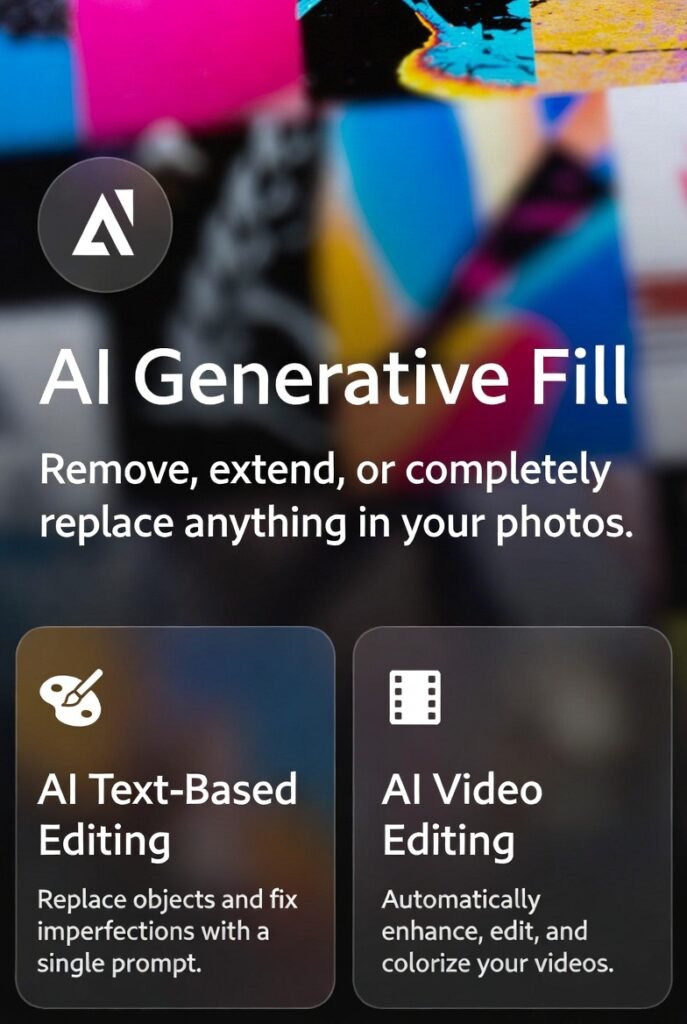
Firefly has evolved into a central all-in-one creative AI studio (web app at firefly.adobe.com), supporting images, video, audio, vectors, and more. It integrates partner models (e.g., Google Veo, Runway, FLUX.2 from Black Forest Labs, OpenAI, ElevenLabs, Topaz Astra) for choice and advanced results.
Core Generative AI Tools & Features (Firefly-Centric)
- Text-to-Image & Image Generation — Generate high-res images (up to native 4MP with Firefly Image Model 5) from prompts. Supports styles, references, composition, and advanced editing.
- Prompt to Edit / Generative Fill & Expand — Natural language edits: add/remove/transform objects, backgrounds, or elements in images/videos. One of the top-used features in Photoshop (daily use by ~2/3 of beta users).
- Image-to-Video & Text-to-Video — Create dynamic videos/clips; includes camera-motion controls, precise prompt-based edits, reference video style transfer, and transitions.
- Generate Sound Effects & Audio — Prompt-based custom sound effects, Generate Soundtrack (instrumental tracks), Generate Speech (lifelike voiceovers in multiple languages with emotion/pacing control).
- Video Editing & Upscaling — Dedicated Firefly Video Editor (public beta): prompt edits, upscaling (e.g., Topaz Astra), bulk processing.
- Vector & Design Tools — Generative Recolor in Illustrator, Text to Template in Express.
- Firefly Boards — Collaborative ideation surface: generate/remix references, rotate 3D objects from 2D, organize inspiration.
- Other Enhancements — Bulk background removal/replacement, color grading multiple images, Translate Video/Audio (multilingual dubbing/lip-sync), custom models (brand-specific in beta).
Others Important:
Video
Generate AI Video
Generate Video from Image
Generate Talking Avatar
Generate Animation
Translate Video
Design
Generate AI Art
Generate AI Character
Generate Tattoo Art
Generate Pixel Art
Generate Graffiti Art
Generate AI Anime Art
Generate Comic
Generate Painting
Generate Cartoon
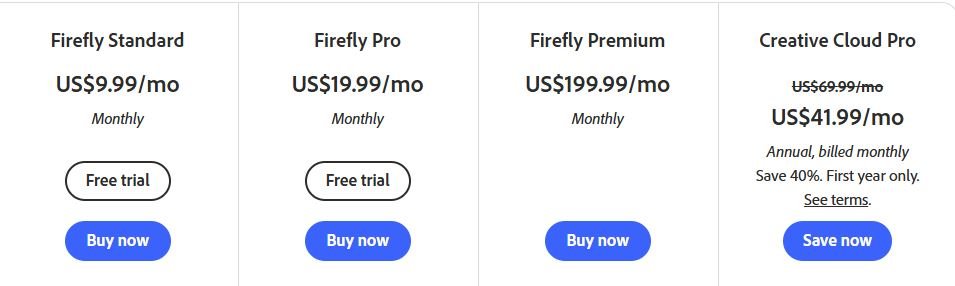
Pricing:
Integration in Key Apps (Powered by Firefly & Sensei)
- Photoshop — Generative Fill/Expand (top 5 features), automated layers, background removal.
- Premiere Pro / After Effects — AI-assisted editing, sound effects, video generation workflows.
- Illustrator / Express — Generative Recolor, Text Effects, quick templates.
- Acrobat / Reader — AI Assistant for summaries, queries, conversational interfaces.
- Experience Cloud — Personalization, predictive analytics, content automation (e.g., Adobe Brand Concierge).